Saved Payment Methods
Saved payment methods let you securely store a customer’s payment information in BlueSuite so you can charge invoices immediately after work is completed. As a result, this feature helps reduce late payments, simplify billing, and speed up checkout for repeat and recurring customers.
In this guide, you will learn how payment methods on file work, how to add them to a customer record, how to charge them from an invoice, and how BlueSuite protects sensitive payment information.
How Payment Methods on File Work in BlueSuite
When you add a payment method to a customer record, BlueSuite securely associates that information with the customer for future use. Because the payment details already exist on file, you can charge them directly from an invoice without re-entering card or bank information.
Before saving any customer payment information, you must first set up online payments in your account. If payments are not configured, you will not be able to add or charge stored payment details. For step-by-step instructions, see our guide on setting up online payments.
Once payments are configured, storing payment information helps you collect payments faster while reducing administrative effort.
How to Save a Customer’s Payment Method
To add a payment method to a customer record in BlueSuite, follow these steps:
- Navigate to the Contacts module.
- Select the customer you want to add payment information for.
- Scroll down to the Payment Methods section of the customer record.
- Click “+ Payment Method”.

Required Fields When Adding Payment Information
When the Add Payment Method form opens, complete the following required fields.
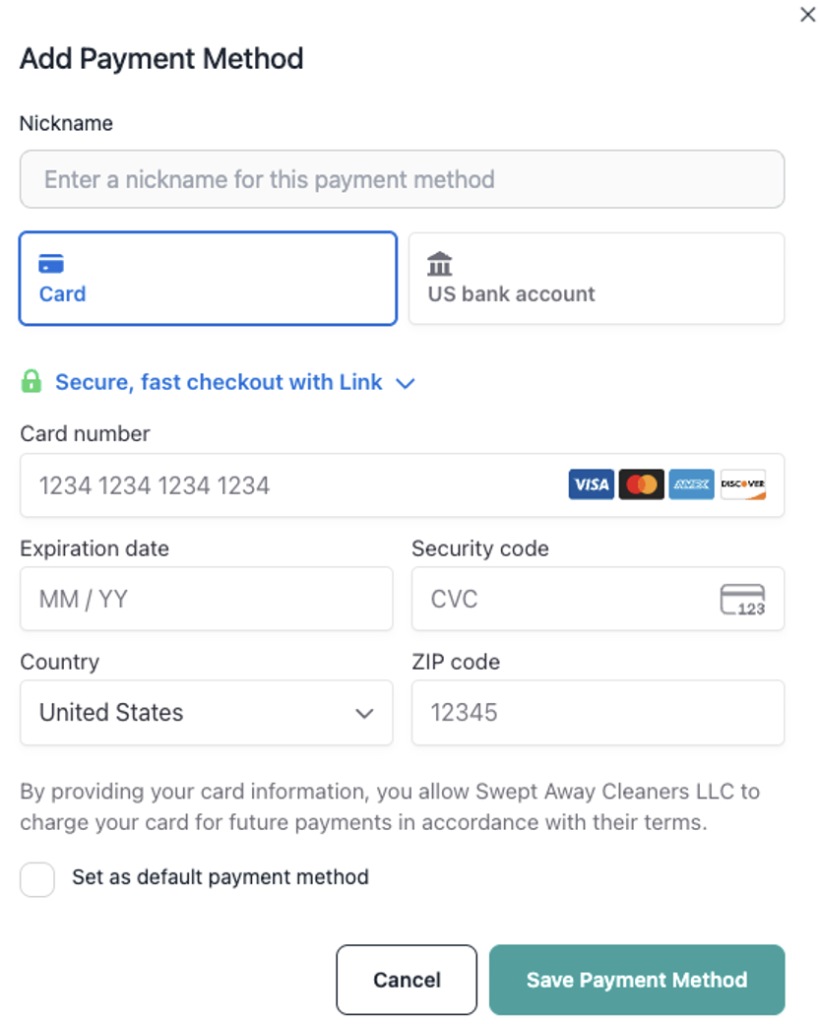
Nickname: Choose a clear label for the payment method, for example “Visa ending in 1234”.
Payment Type
Select one option:
- Card
- US bank account
Card number
Expiration date
Security code
Country
ZIP code
After you complete all required fields, save the payment information. BlueSuite then attaches the payment method to the customer’s record.
Important Permission and Responsibility Notice
By saving a customer’s payment information in BlueSuite, the customer authorizes your business to charge that payment method for future payments according to your terms and conditions.
Therefore, your company must:
- Explain clearly how stored payment information will be used
- Obtain explicit customer permission before saving payment details
- Confirm that the customer agrees to your terms and conditions
BlueSuite does not request, verify, or grant authorization on your behalf. Instead, your business remains fully responsible for customer consent and compliance.
Payment Security and Encryption
BlueSuite encrypts all stored payment information and processes it securely through Stripe, our payment processing partner. At no time can users or BlueSuite employees view full payment details.
Specifically:
- The system never displays full card numbers or bank account details
- Only masked information, such as the last four digits and card brand, appears
- Team members cannot access complete payment data
- BlueSuite employees cannot access complete payment data
BlueSuite does not store raw payment credentials. Industry-standard encryption and security controls protect all customer payment information while still allowing you to charge invoices securely. To learn more about how secure payment systems work, visit Stripe’s overview here.
Confirming a Payment Method Was Saved
After you save payment information, BlueSuite displays the payment method in the Payment Methods section of the customer’s contact record. From there, you can select it whenever you charge invoices for that customer.

How to Charge a Payment Method From an Invoice
Once a customer has a payment method on file, you can charge it directly from an invoice.
- Open the customer’s invoice.
- Navigate to the Payments section.
- Click “+ Payment”.
- Select “Charge Saved Payment Method” at the top of the Add Payment window.

Charging the Payment Method
To process the charge:
- Enter the amount you want to charge.
- Enter a tip amount, if applicable.
- Select the payment method you want to use.
- Add internal notes for reference.
- Click “Charge”.
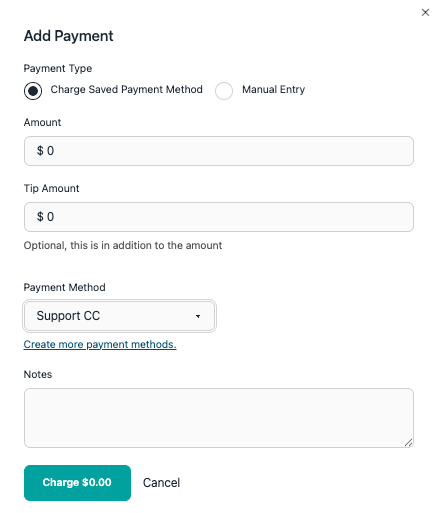
After you submit the charge, BlueSuite immediately records the payment on the invoice.
Payment Confirmation
Once the charge succeeds:
- BlueSuite collects the payment
- The system records the transaction on the invoice
- The invoice balance updates automatically

As a result, no additional action is required.
Summary
Saved payment methods help you collect payments faster, reduce late invoices, and simplify billing for repeat customers. When you obtain proper authorization and set up online payments in advance, payment methods on file provide a secure and reliable way to charge customers immediately after work is completed.
Before using this feature, make sure your internal policies clearly explain authorization, usage, and customer consent.