Route Optimization
Spend Less Time Driving, More Time Working
Drive Time Built In
BlueSuite calculates real drive time between each stop and uses it to build a schedule that makes sense. Your team spends less time in the truck and more time on the job.
Stays Within Business Hours
Optimized routes are scheduled so every appointment lands within your business hours. No more running over at the end of the day or showing up before you open.
Custom Start Locations
Each team member can set their own starting location for the day. Routes are built from where they actually are, not a fixed office address. Workspace admins can turn this off if needed.

Smarter scheduling starts with smarter routes

Map View
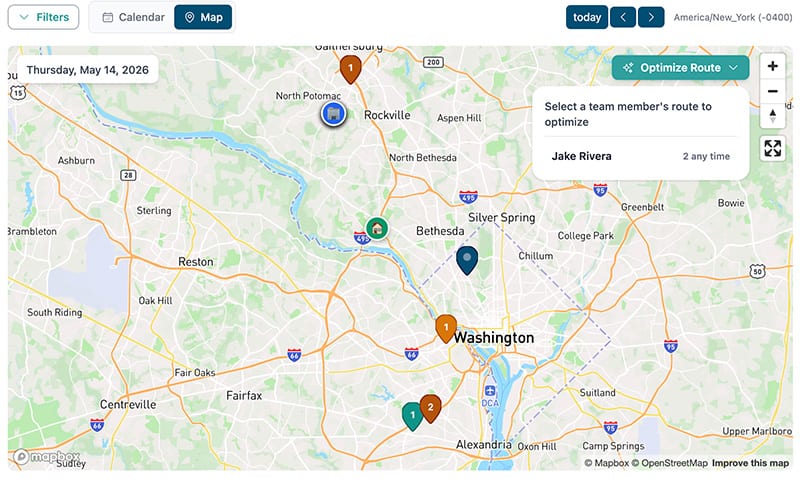
Switch to the map view in your calendar to see every job and appointment plotted on a map. Pins are grouped by team member so you can quickly spot where everyone is headed. From here, click "Optimize Route" and select a team member to get started.
One-Click Optimization
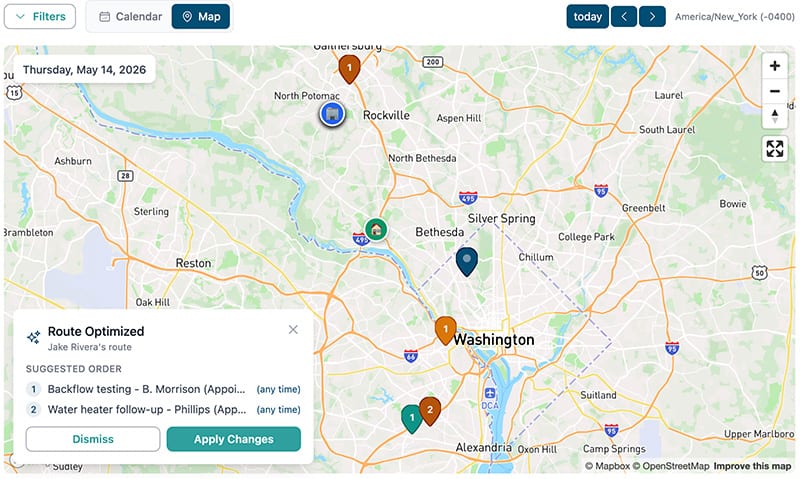
Select a team member and BlueSuite calculates the most efficient order for their stops. It starts from that person's set starting location, factors in drive time between each appointment, and keeps everything within business hours. Review the suggested order, then apply the changes to your schedule.
Ready to take your home service business to the next level?
Frequently Asked Questions
How does route optimization work?
Open the map view in your calendar, click "Optimize Route," and select a team member. BlueSuite starts from that person's starting location, calculates drive time between each stop, and reorders them so the route is as short as possible while keeping everything within your business hours. You review the suggested order and apply it with one click.
Does it factor in drive time?
Yes. BlueSuite calculates the actual drive time between each appointment and uses that to determine the best order. It also accounts for where the team member starts their day so the first stop makes sense geographically.
Does it change the times of my appointments?
Route optimization reorders stops that have flexible timing (marked as "any time"). Appointments with fixed start times stay where they are, and the flexible stops are arranged around them. All appointments are scheduled to fall within your business hours.
Can team members set their own starting location?
Yes. Each team member can set their own start-of-day location, so routes are built from where they actually are rather than a single office address. This is great for teams that start from home or different job sites. Workspace admins can disable this setting if they prefer everyone starts from the same location.
Can I optimize multiple team members at once?
You optimize one team member's route at a time. This lets you review each person's suggested stop order individually before applying it. Select a different team member and run it again to optimize their route next.
Which plans include route optimization?
Route optimization is included with both the Essential and Advanced plans. There are no add-on fees or usage limits.
Do I have to accept the suggested route?
No. After BlueSuite calculates the optimized order, you can review it before applying. If it looks good, click "Apply Changes." If not, dismiss it and keep your current schedule.
Does route optimization work on mobile?
Route optimization is currently available in the web dashboard. Your optimized schedule syncs to the mobile app so your team always sees the latest stop order on their phone.