BlueSuite vs Housecall Pro: Pricing, Features, and Best Fit
Field service software tends to make the same promise: less chaos, more control, better growth.
Then the pricing table shows up.
That is where the truth usually lives. Not in the slogan. Not in the demo script. In the monthly cost, the user limits, the add-ons, and the features that only appear once you climb into a higher plan.
BlueSuite and Housecall Pro both help home service businesses manage the work: customers, jobs, schedules, quotes, invoices, payments, and field teams. This is not a question of whether Housecall Pro is useful. It is.
The better question is whether a small team needs the weight and cost of a larger platform to run the business well.
BlueSuite is built for service businesses that want the core workflows first: CRM, scheduling, job management, quoting, invoicing, payments, reporting, mobile access, online booking, and website tools. Housecall Pro brings a broader feature set, especially around customer communication, marketing, and integrations.
That is the tradeoff.
If your business needs the heavier stack, Housecall Pro may make sense. If your team wants the tools it will actually use every day at a lower monthly cost, BlueSuite is the cleaner fit.
To review current plan options, visit the BlueSuite pricing page.
Quick Verdict
BlueSuite is the better fit for small home service businesses that want practical field service tools, simple pricing, and lower overhead.
Housecall Pro is the better fit for companies that need built-in marketing, postcards, premium review tools, deeper customer communication, or a larger integration ecosystem.
That is the honest split.
A small team does not need bloated software to look professional. It needs order. Customers in one place. Jobs on the schedule. Quotes sent quickly. Invoices paid. The crew informed. The owner not buried in admin work.
BlueSuite focuses there.
Pricing Comparison
A platform that gets more expensive every time a team grows should have to justify that cost with features the business actually uses. Not hypothetically. Not someday. Now.
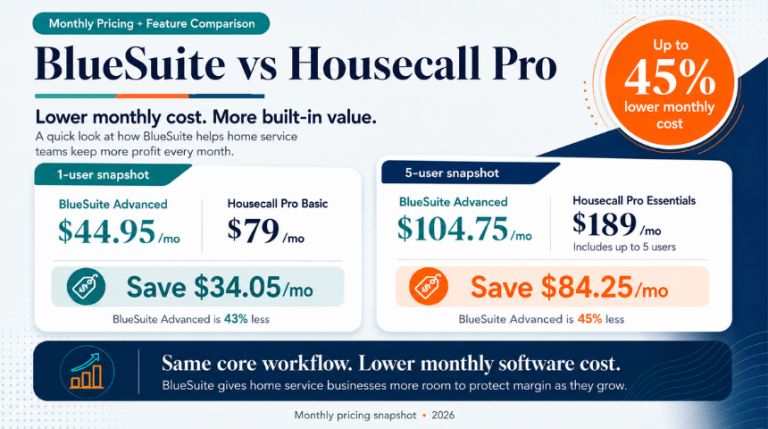
BlueSuite Advanced starts at $44.95/month for the platform and first user, then $14.95/month for each additional user.
Housecall Pro offers Basic, Essentials, and Max plans. You can review its current public plans on the Housecall Pro pricing page.
In the table below, Advanced refers to BlueSuite’s Advanced plan. Basic, Essentials, and Max refer to Housecall Pro plans.
| Team Size | BlueSuite Advanced | Housecall Pro Comparable Plan | Housecall Pro Cost | Monthly Savings | Annual Savings |
|---|---|---|---|---|---|
| 1 User | $44.95/mo | Basic | $79/mo | $34.05/mo | $408.60/year |
| 5 Users | $104.75/mo | Essentials | $189/mo | $84.25/mo | $1,011/year |
| 8 Users | $149.60/mo | Max | $329/mo | $179.40/mo | $2,152.80/year |
| 15 Users | $254.25/mo | Max + Additional Users | $574/mo | $319.75/mo | $3,837/year |
At five users, BlueSuite Advanced saves $84.25 per month compared to Housecall Pro Essentials. At 15 users, the estimated savings rise to $319.75 per month.
That is not a minor discount. That is payroll, fuel, insurance, equipment, ads, or profit.
The principle is simple: software should help a business grow. It should not punish the owner for adding people to the team.
For the full plan-by-plan breakdown, see the complete BlueSuite vs Housecall Pro comparison.
Feature Snapshot
The pricing case only matters if the product can still do the work.
A cheaper tool that cannot manage jobs, customers, quotes, invoices, payments, and schedules is not a bargain. It is just a cheaper problem.
BlueSuite is not trying to be the largest platform in the room. It is built to give small service businesses the tools they use every day without forcing them into a heavier system than they need.
Housecall Pro has more built-in growth and communication features. That matters for some teams. The question is whether those features justify the higher cost for your business.
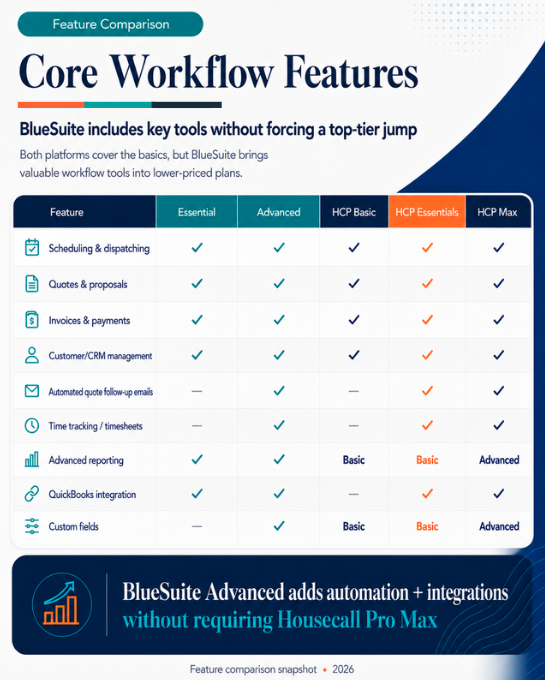
That is the real comparison.
Both platforms let customers book themselves in. Housecall Pro spreads booking across more surfaces, including social media and Google Search and Maps, according to Housecall Pro’s own online booking feature page, and includes it on its entry plan.
BlueSuite online booking is part of the Advanced plan. Customers pick a real appointment time on your website or through a link you share, and only times a bookable team member is genuinely free for are ever offered. The booking is assigned to someone still free at that moment and lands on their calendar, with the length worked out from the services the customer picked.
Housecall Pro keeps its edge in built-in marketing and customer communication.
BlueSuite has the edge when the priority is cost control, core workflows, and a simpler operating system for the business.
If your team mainly needs to manage leads, jobs, quotes, invoices, payments, schedules, and field work, BlueSuite gives you the practical tools without dragging you into a larger software bill.
Ease of Use
Small teams do not need software that turns every task into a process.
They need to add customers, schedule work, send quotes, invoice jobs, collect payments, and see what is happening in the business.
BlueSuite is built around that reality. It gives service businesses a cleaner path through the daily work without burying them in a larger system than they are ready to manage.
Housecall Pro brings more features into the platform, especially around marketing, communication, and integrations. That can be useful. It can also mean more setup, more decisions, and more cost.
There is no mystery here. More software usually means more responsibility.
The right question is not “Which platform has more?” The right question is “Which platform gives this business what it needs now?”
Scheduling and Job Management
A service business lives or dies by the schedule.
Missed jobs, scattered notes, unclear assignments, and sloppy handoffs cost real money. Not theoretical money. Real money.
BlueSuite gives teams the structure to manage jobs, schedules, attachments, forms, checklists, routes, and job costs. That is the backbone of the operation.
On the Advanced plan the schedule also fills itself. Customers who book online are placed on a specific person’s calendar, in a slot that respects their working hours, the jobs they already have, your holidays, and the buffer you keep between visits.
Housecall Pro is also strong here. Scheduling, dispatching, job tracking, and field team workflows are central to its platform. Larger teams may appreciate that depth, especially if they also need broader communication and marketing features.
For smaller teams, the point is sharper: they need a reliable job management system that does not come with unnecessary weight.
Learn more about BlueSuite job management software.
Quotes, Invoices, and Payments
Quotes are not paperwork. They are sales opportunities.
Invoices are not admin. They are cash flow.
Both platforms support quotes, invoices, and payments. Housecall Pro offers strong tools here, and BlueSuite covers the same essential workflow: create the quote, schedule the job, send the invoice, collect the payment, and move forward.
This is where overbuying software becomes easy.
A business owner sees a long feature list and assumes more features must mean more value. Sometimes that is true. Often, it is just a longer list.
The test is whether the software helps the team move faster from lead to paid job.
BlueSuite is built for that path.
Integrations and Technology
Housecall Pro has a broader integration ecosystem. For businesses with more tools in the stack, that may matter. Its website includes dedicated pages for QuickBooks integration and broader Housecall Pro integrations.
BlueSuite focuses on practical connectivity for smaller teams: QuickBooks Online sync, Zapier access on Advanced, and the BlueSuite ChatGPT plugin.
The ChatGPT plugin is not window dressing. It gives users a faster way to work with contacts, jobs, quotes, invoices, and schedules through AI-powered workflows.
That is where business software is heading: fewer clicks, faster action, less admin drag.
Learn more about the BlueSuite ChatGPT plugin.
Website and Online Presence
A service business without a credible online presence is making every sale harder.
BlueSuite includes an AI-powered website option built for home service businesses. That helps companies explain their services, support local SEO, build trust, and convert visitors into leads.
The website is not decoration. It is part of the sales system. On Advanced you can put a booking form on it, so a visitor who is ready to hire you does not have to wait for someone to call them back.
Housecall Pro also offers tools that support growth and booking, especially for businesses that want customers to schedule from more places, including social profiles and search results.
The difference comes down to fit. BlueSuite gives small teams an affordable way to build an online foundation, take bookings from it, and run the business from the same place. Housecall Pro offers a broader marketing layer for teams that want more built in.
Learn more about the BlueSuite AI-powered marketing website.
Best Fit by Business Size
Solo Operators
Solo operators usually need simple tools: CRM, scheduling, quotes, invoices, payments, and a clean way to stay organized.
BlueSuite Essential is a strong fit because it starts at a lower monthly cost and covers the core workflows. If you want customers booking themselves in from day one, BlueSuite Advanced adds online booking and still costs less than Housecall Pro Basic.
Housecall Pro Basic may be a better fit for solo operators who want booking on the cheapest plan and more customer-facing tools from the start.
Small Teams
For teams with two to eight users, pricing starts to matter more.
This is where BlueSuite’s user-based pricing creates a real advantage. Small teams can keep job management, quoting, scheduling, invoicing, payments, online booking, and reporting in one place without jumping into a much higher monthly bill.
Housecall Pro Essentials and Max may be a stronger fit for teams that need postcards, email marketing, employee GPS tracking, visual price books, or premium review tools.
Growing Teams
Larger teams may need deeper onboarding, stronger customer communication, and a broader integration ecosystem.
Housecall Pro Max may be a better fit for those companies.
BlueSuite Advanced is a strong fit for growing teams that want more capability while still controlling monthly costs. It gives businesses a practical upgrade path without making the software bill feel like a tax on growth.
Where BlueSuite Wins
BlueSuite is the stronger fit for small home service businesses that want lower monthly costs, simple pricing, CRM, job management, scheduling, quoting, invoicing, payments, reporting, mobile access, online booking, website tools, and AI-powered workflows.
That is the core of the business.
BlueSuite does not ask small teams to pay for a larger system just to get organized. It gives them the operating tools they need and keeps the monthly cost under control.
For many businesses, that is the more responsible choice.
Where Housecall Pro Wins
Housecall Pro is stronger for businesses that need built-in marketing, customer communication tools, postcards, premium review management, employee GPS tracking, booking across social and search as well as their website, advanced support, and a larger integration ecosystem.
There is value there.
But value depends on use. Paying for features your team does not need is not investment. It is leakage.
Housecall Pro makes sense when those advanced tools are central to how the business sells, books, and manages work. If they are not, BlueSuite deserves a serious look.
Which Platform Should You Choose?
Choose BlueSuite if you want an affordable field service platform for managing customers, jobs, schedules, quotes, invoices, payments, reporting, websites, online booking, and field operations.
Choose Housecall Pro if you need built-in marketing tools, postcards, more advanced customer communication, booking from social and search, or a larger integration ecosystem.
The decision is not complicated once the incentives are clear.
If your team wants the essentials without paying for bloat, BlueSuite is the smarter place to start.
You can also compare other platforms on the BlueSuite comparison hub or read the BlueSuite vs Jobber comparison.
FAQ
Is BlueSuite cheaper than Housecall Pro?
Yes. Based on the comparison data, BlueSuite Advanced is less expensive across the reviewed team sizes. At five users, Advanced is $104.75/month compared to Housecall Pro Essentials at $189/month.
How much can BlueSuite save compared to Housecall Pro?
At five users, BlueSuite Advanced saves $84.25 per month compared to Housecall Pro Essentials. That equals $1,011 in estimated annual savings. At 15 users, Advanced saves an estimated $319.75 per month compared to Max with additional users.
Does BlueSuite have online booking?
Yes, on the Advanced plan. Customers pick an appointment time on your website or through a link you share. BlueSuite only offers times a bookable team member is actually free for, works out the length from the services the customer selects, and assigns the visit to someone who is still free when the booking goes through.
Who is BlueSuite best for?
BlueSuite is best for small home service businesses that want affordable software for CRM, scheduling, job management, quoting, invoicing, payments, reporting, mobile access, online booking, website tools, and AI functionality.
Who is Housecall Pro best for?
Housecall Pro is best for businesses that need built-in marketing tools, customer communication, postcards, advanced review management, booking from social media and search results, and a larger integration ecosystem.
Is BlueSuite a Housecall Pro alternative?
Yes. BlueSuite is a practical alternative for small home service businesses that want core field service tools, online booking, website support, mobile access, and AI-powered workflows at a lower monthly cost.
Pricing and feature availability can change. This comparison is based on publicly available information and internal comparison data available at the time of writing. Always review each provider’s current pricing and plan details before making a purchase decision.