Change Order Software for Home Service Jobs
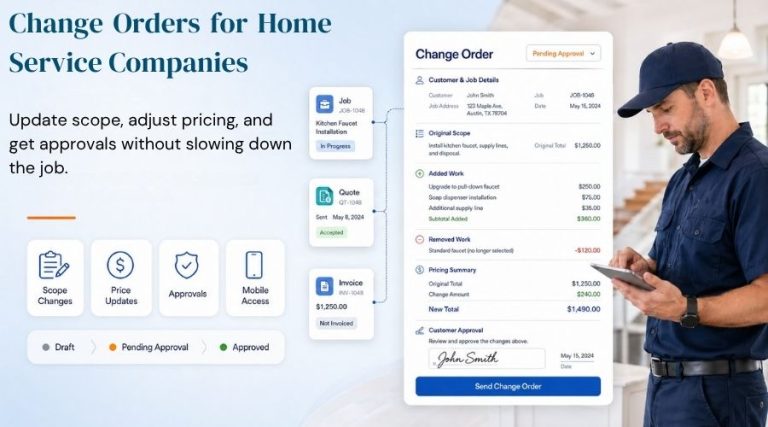
Change order software helps home service businesses manage scope changes without losing control of the job, the price, or the customer approval process. Scope changes are not the problem. Undocumented scope changes are.
Every home service business eventually runs into the same reality. A job starts with one scope, then the facts change. A customer asks for more work. A technician finds an issue that was not visible during the estimate. Materials, labor, or pricing may need to change.
That is normal field work.
The problem starts when those changes are handled casually. A line item gets edited. A verbal approval gets treated like a contract. Extra work gets done because “it will only take a few minutes.” Naturally, those few minutes become unpaid labor, confused customers, and invoices that need too much explaining.
BlueSuite’s change order software gives home service businesses a cleaner way to manage scope changes on active jobs. You can create a change order, document what changed, send it for approval, collect a signature, and merge the approved updates back into the job.
BlueSuite’s change order software works inside its job management software, so scope changes stay connected to the active job.
In other words, the job can change without the process falling apart.
What Is a Change Order?
A change order is a formal update to an existing job or project. It documents a change to the original scope of work, cost, materials, labor, or schedule. In construction and service work, change orders are commonly used to update the original agreement when the scope, price, or timeline changes.
For home service businesses, a change order may be needed when:
- A customer requests extra work
- A technician discovers an additional repair
- The original scope was incomplete
- Materials or labor requirements change
- A line item needs to be added, modified, or removed
- The customer needs to approve a new total before work continues
Let’s be clear. A change order is not extra paperwork for the sake of paperwork. It is the difference between documented work and disputed work.
Why Change Orders Matter for Home Service Jobs
Home service jobs rarely unfold in perfectly clean lines.
A plumber opens a wall and finds a larger issue. An electrician arrives for one repair and the customer asks for two more outlets. A cleaning company books a standard cleaning and arrives to find extra rooms, extra requests, and apparently a brand-new definition of “standard.”
That is how scope creep happens.
The Project Management Institute explains that scope change control helps protect projects from scope creep and keeps stakeholder expectations aligned. The same principle applies to home service work. If the scope changes, the approval should change with it.
Without a clear change order process, businesses risk unpaid work, customer disputes, confused teams, and final invoices that feel like a surprise.
That is not service. That is disorder with a friendly logo.
How BlueSuite Change Orders Work
BlueSuite’s change order software is built directly into jobs.
When a job is in progress and something needs to change, you can create a change order from the job page. The change order starts in Draft status, so your team can review the update before sending it to the customer or approving it internally.
On the change order page, you can:
- Add a custom name
- Add a description explaining the scope change
- Add new line items
- Modify existing line items
- Remove line items
- Review what changed from the original job
BlueSuite highlights added, modified, and deleted line items, so everyone can see exactly what changed.
That matters because visibility is the point. No one should have to reconstruct the truth from memory, text messages, and vague notes typed in a driveway.
Lock In-Progress Job Line Items
BlueSuite also gives businesses more control over in-progress job changes.
Change orders are optional, but you can turn them on by going to Settings, clicking Jobs, and enabling Change Orders.
You can also enable “Require change orders to modify in-progress line items”. When this setting is on, line items on in-progress jobs are locked and can only be changed through a change order.
That is a serious operational control.
It means the scope cannot quietly drift once the job is active. The change must be documented first.
In other words, BlueSuite lets you decide whether active jobs should be managed by process or by vibes.
Choose process.
Send Change Orders for Customer Approval
Some change orders need customer approval before work continues.
In BlueSuite, you can send a change order by:
- SMS
- Shareable link
Once sent, the change order status automatically updates from Draft to Sent.
The customer can open the link, review the change order, see added or updated line items, view the new total, and approve the change with a typed or drawn signature.
Customers can review job updates through a clean approval experience that keeps communication organized, similar to the way BlueSuite’s client portal helps customers view important job and account details.
Once approved, BlueSuite automatically merges the change order into the job. A signed PDF copy is also generated and emailed to the customer.
That record matters. In more formal construction environments, formal change documentation is used to modify agreed work and preserve a clear contract trail. Home service jobs may be smaller, but the principle is the same: when the work changes, the record should change too.
That is the clean version of the process.
The customer sees the change. The customer approves the change. The job updates only after approval.
What If the Customer Rejects the Change Order?
Not every change order gets approved.
If a customer rejects a change order in BlueSuite, they must provide a reason. The status updates to Rejected, and the job line items remain unchanged.
A rejected change order should not quietly alter the job. It should preserve the original scope unless the customer agrees to the new one.
This is how disputes are reduced: not with charm, but with records.
Internal Change Order Approval
Not every change order needs to be sent to a customer.
Sometimes the change is internal. Maybe your team needs to correct a line item, restructure the job, or document an update that does not require customer approval.
In BlueSuite, you can click Approve and Merge to merge the change order directly into the job without sending it to the customer.
The principle stays the same: the change is documented before it becomes part of the job.
Change Order Statuses
BlueSuite uses clear change order statuses:
- Draft – Created but not yet sent
- Sent – Sent to the customer and waiting for a response
- Merged – Approved and applied to the job
- Rejected – Declined by the customer
- Archived – Hidden from the customer portal but still visible internally
These statuses make change order tracking easier and remove ambiguity.
And ambiguity is usually where the rot begins.
Change Order Software vs. Manual Change Order Forms
Many businesses still manage change orders with PDFs, spreadsheets, text messages, or handwritten notes.
That can work for a while. Then the business grows, jobs multiply, and the “simple” manual process becomes a drawer full of loose ends.
Manual change order forms can get buried in email threads. They may not connect cleanly to the job. Someone still has to update the job manually after approval.
BlueSuite keeps the workflow connected. You create the change order from the job, update line items, send it for approval, collect a signature, generate a signed PDF, and merge the approved changes back into the job.
That is the difference between having a document and having a process.
Better Scope Control for Home Service Businesses
BlueSuite change orders help home service businesses manage job changes without losing control of scope, pricing, or customer communication.
For businesses that want a cleaner way to manage jobs in BlueSuite, change orders create a formal process for handling scope changes after work begins.
For any home service business that deals with changing job scope, change order software creates the structure needed to keep work, pricing, and approvals aligned.
If the work changes, the agreement should change too.
BlueSuite gives you the process to make that happen.