Field Service Checklist Software for Home Service Teams
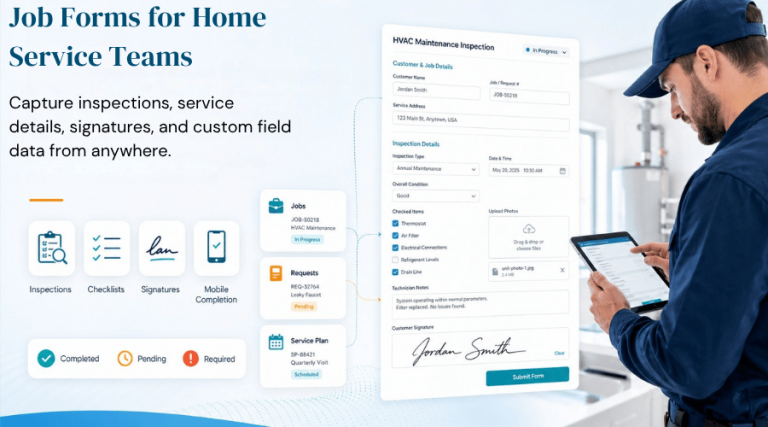
Running a home service business means keeping track of a lot of small details.
Technicians take photos before leaving a job. Cleaners complete final walkthroughs. Maintenance teams document equipment conditions after each visit.
These steps are not complicated. They just get missed when the day gets busy.
Field service checklist software helps teams stay organized and finish jobs the right way.
BlueSuite’s job forms and checklists let businesses create digital forms, add them to jobs, requests, appointments, and service plans, and require employees to submit them before closing out work.
What Is Field Service Checklist Software?
Field service checklist software helps service businesses create digital checklists, inspection forms, and job documentation that employees complete while they perform the work.
In simple terms, it helps teams follow the right steps while they work in the field.
This matters because repeatable work needs a repeatable process. The U.S. Chamber of Commerce explains that standard operating procedures help businesses improve consistency, organization, and accuracy. Checklists also support repeat tasks that teams need to complete the same way over time.
For home service businesses, this can include job checklists, site inspection forms, service checklists, and other field service forms that help employees complete and document their work.
Why Job Forms and Checklists Matter
Most home service work includes a series of small but important steps.
A plumbing repair may require photos, notes, cleanup, testing, and customer confirmation. Cleaning teams may need a room-by-room quality check. HVAC technicians may need to record inspection details, filter status, equipment notes, and follow-up recommendations. Pest control teams may need to document treatment areas, materials used, and safety notes.
Job forms and checklists make those steps easier to complete consistently.
They give employees a clear process to follow. They also give managers better visibility into completed work. Over time, this can reduce confusion, improve documentation, and create a more reliable customer experience.
Replace Paper Forms With Custom Job Forms
Paper forms can work for a while, but they often create problems as a business grows.
Teams can misplace them. Managers may struggle to search them. Paper forms may not stay connected to the job they belong to. In many cases, someone eventually has to enter the same information somewhere else.
BlueSuite’s custom job forms help businesses create forms around their actual workflow. A cleaning company can create a final walkthrough form. An HVAC company can build a system inspection form. A plumbing company can use a job completion form. A lawn care company can create a recurring service checklist.
This keeps documentation connected to the work itself.
Instead of spreading information across paper forms, text messages, photos, and notes, BlueSuite gives teams one place to manage field service forms as part of the job process.
Use Service Checklists to Create Consistent Work
Customers expect the same level of service no matter which employee arrives.
That becomes difficult when each person relies on personal memory or habits. Service checklists create a standard process for common tasks.
A checklist can remind the team to inspect the work area, confirm customer notes, upload photos, test equipment, clean up, lock gates, collect signatures, or record follow-up recommendations.
This kind of structure already plays an important role in field service operations. NetSuite notes that field service management software can use checklists to help teams complete required steps or inspections. It can also help businesses store information for reporting, compliance, and audits.
For a small home service business, the value is practical. Service checklists help teams complete the right steps and document the work while the details remain fresh.
Create Job Checklists for Different Types of Work
Not every service needs the same checklist.
A cleaning company does not need the same form as an HVAC company. Lawn care crews do not need the same checklist as plumbers. Recurring maintenance visits do not need the same process as one-time repairs.
BlueSuite allows businesses to create reusable job checklists and attach the right forms to the right work. Teams can connect forms to jobs, requests, appointments, and service plan appointments. Businesses can also add default forms, so new jobs or requests automatically include the forms the team needs.
This helps each business create a process that fits the service.
For example, an HVAC business may use a system inspection checklist. A cleaning company may use a room-by-room quality checklist. Pest control teams may use a treatment documentation form. A handyman business may use a job completion checklist.
The goal is not to add unnecessary admin work. The goal is to make important steps easier to follow.
Site Inspection Forms Improve Documentation
For many home service businesses, inspections play an important role in the job.
Site inspection forms help teams document property conditions, safety concerns, customer requests, materials needed, photos, and completed work. This improves communication between field teams, office staff, managers, and customers.
Good documentation can also help reduce avoidable risk. OSHA’s Job Hazard Analysis guide explains the importance of reviewing job tasks to identify hazards before they occur. While most home service forms do not function as formal safety analyses, the same general principle applies: clear documentation helps teams record conditions and make better decisions.
That is why inspection checklist software can help. It allows businesses to capture important job information at the time the team performs the work.
Mobile Service Checklists Help Teams Work in the Field
Field teams need tools that work where the job happens.
They may work in homes, offices, basements, attics, yards, mechanical rooms, or job sites. If the process only works from a desktop computer, field employees may not use it consistently.
Mobile service checklists help teams complete forms while they perform the work. A technician can upload a photo from the job site. A cleaner can complete a final walkthrough before leaving. A maintenance worker can document an issue while looking at it.
This makes the information more accurate and easier to collect.
It also gives managers better visibility without requiring them to chase paper forms or follow up later for missing details.
Examples of Job Forms and Checklists
Here are a few practical examples of forms a home service business can create in BlueSuite.
Require a Checklist Before Closing Work
The end of a job is when details get missed. Crews are moving to the next stop. Customers have questions. The owner needs to know the work was actually completed.
BlueSuite allows business owners to require a submitted form before an employee can mark a job or appointment done. If required items are still pending, the employee must submit them before completing the job or appointment.
That creates a simple rule: finish the checklist before closing the work.
Field Forms for Service Plans and Recurring Work
Recurring work needs consistency. Maintenance plans, recurring cleanings, lawn care routes, pest control visits, pool service, and scheduled service visits all depend on repeatable steps.
Each visit should leave behind a clear record.
A recurring service checklist guides each visit, documents completed work, and gives the owner a service history they can review later.
Final Takeaway
Growing service businesses need fewer loose ends.
BlueSuite’s job forms and checklists help teams follow the right steps, collect the right details, upload files and photos, track form status, and require documentation before jobs or appointments are marked complete.
That gives owners a cleaner way to manage field work without relying on memory, paper forms, text threads, or after-the-fact updates.