How to Use Custom Fields
Custom fields in BlueSuite let you personalize your workspace by capturing the unique details that matter to your business. You can add fields to contacts, quotes, jobs, invoices, and more — helping you track data like customer preferences, lead sources, and internal notes.
By using custom fields, you make BlueSuite flexible enough to match your exact workflows and maintain structured data.
Creating a Custom Field
Navigate to Settings > Workspace > Custom Fields, then click + Custom Field to open the create modal. In the modal, pick the module the field should appear on (this determines which part of BlueSuite your new custom attribute appears in) and the field type, then click Save.
Available Module Types:
- Contact
- Quote
- Job
- Workspace
- Request
- Invoice
- Properties
- Equipment
In this example, we’ll create a custom attribute to track whether a customer has already left a Google review. Since this applies to customer profiles, select Contact as the module type.
Field Types
The field type defines how data is captured and rendered in your custom fields. BlueSuite supports several formats for custom fields to suit different use cases.
Available Field Types:
- Text – For freeform notes or descriptive content
- Checkbox – For binary yes/no or true/false values
- Number – For numerical inputs such as hours, counts, or percentages
- Select – For dropdown lists with predefined options
- Date and Time – For day and time values
- File Upload – For attaching an image, document, or video
Example: Creating a Checkbox Field (Google Review)
Checkbox fields are best when you need a quick on/off indicator. Here’s how to add one in the create modal to track review status.
- Enter a Label: Google Review
- Set Field Type to Checkbox
- Leave default unchecked (interpreted as “No”)
- Add a Description: “Customer left a Google review.”
- Click Save
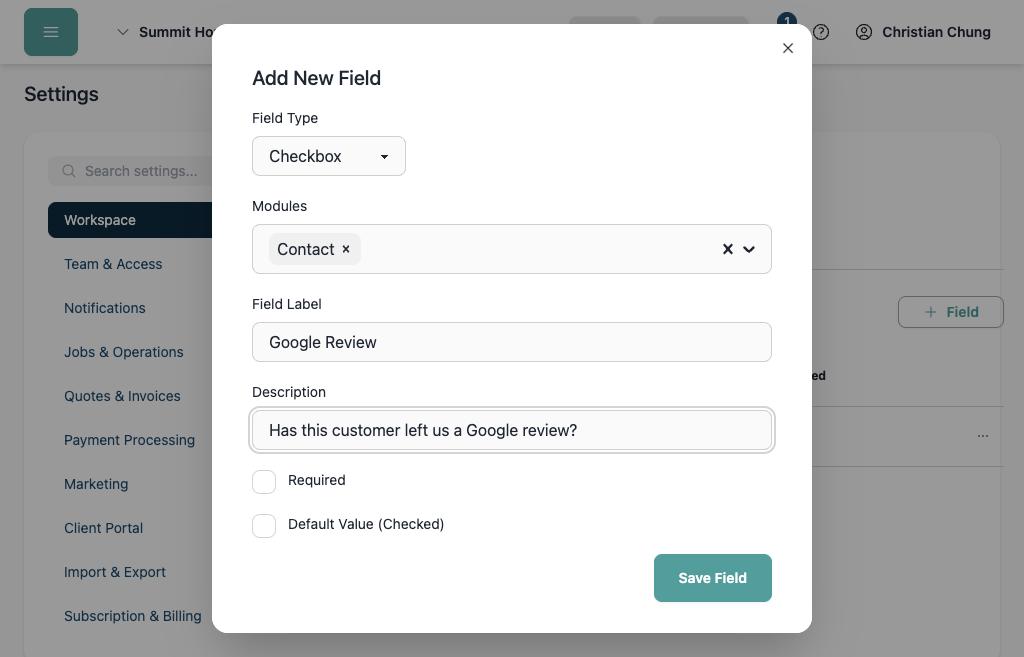
Once saved, the Google Review checkbox will appear under Custom Fields on each customer/contact record. This allows your team to instantly see which customers still need a review request.
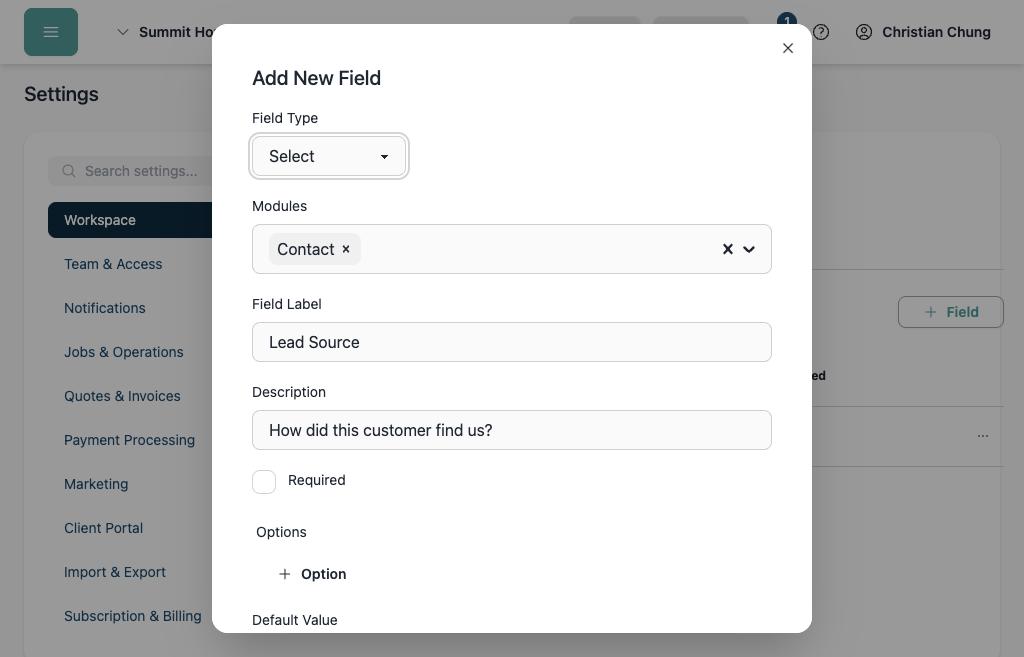
Example: Creating a Select Field (Lead Source)
A select (dropdown) field is ideal when you want users to choose one option from a standardized list, such as how a customer was referred. This helps with reporting, filtering, and data consistency.
Here’s how to build a “Lead Source” dropdown in the create modal:
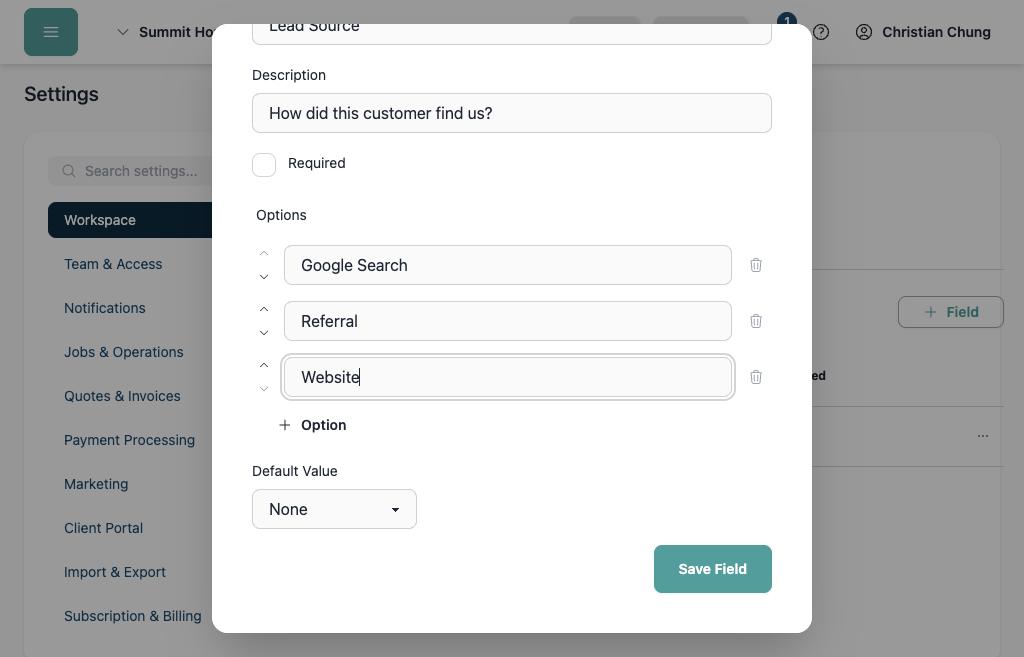
With this custom attribute, you can standardize your lead tracking and easily analyze which channels produce the most customers.
Common Use Cases by Module / Record Type
Here are suggested custom field ideas by module. Use checkboxes, selects, text, or number depending on what fits best.
| Module | Field Name | Suggested Field Type | Purpose / Notes |
|---|---|---|---|
| Contact / Customer | Google Review | Checkbox | Quickly mark who has submitted a review |
| Lead Source | Select | Standardize how you acquired the customer | |
| Blacklist / Do Not Service | Checkbox | Flag customers you don’t want future work with | |
| Veteran Status | Checkbox | Track qualifying statuses | |
| Quote / Proposal | Urgent Request | Checkbox | Mark quotes that require accelerated attention |
| Project Complexity | Select | e.g. Simple, Moderate, Complex, Custom Build | |
| Discount Code Applied | Text | Capture custom promo codes or notes | |
| Competitor Quoted | Checkbox | Whether the customer is comparing quotes | |
| Invoice / Billing | Payment Verified | Checkbox | Confirm that payment has cleared |
| Tax Exempt Customer | Checkbox | Flag tax-exempt clients | |
| Invoice Category | Select | e.g. Maintenance, Project, Emergency Call | |
| Accounting / GL Code | Text | For internal accounting classification | |
| Job / Project | Requires Permit | Checkbox | Indicate jobs needing permits |
| Priority Level | Select | e.g. High, Medium, Low | |
| Materials Provided by Customer | Checkbox | Mark when customers supply materials | |
| Safety Waiver Signed | Checkbox | Compliance tracking | |
| Property | Gate Code | Text | Use when the property requires a gate access code |
| Warranty | File Upload | Record a warranty document for work performed at a property |
Why Custom Fields and Data Structuring Matter
Data without rules is gossip. Custom fields impose discipline. They turn habits into systems and opinions into metrics.
Major platforms preach the same principle. Salesforce teaches administrators to create custom fields and picklists because structure is the foundation of reliable CRM data. IBM outlines a data governance strategy built on consistency, security, and accountability. Harvard Business Review reminds leaders that disciplined data programs build trust in Getting Your Company’s Data Program Back on Track. And if you want a manager’s primer on the moral side of information integrity, Harvard Business School Online explains why data governance matters.