Service Plans
Service Plans in BlueSuite let you offer recurring maintenance memberships with automated billing, recurring service visits, and subscriber notifications. You can create custom plans, add optional upgrades, and let customers subscribe through your client portal.
Create a Service Plan
To create a new service plan, log in to your BlueSuite workspace and navigate to Service Plans from the left-hand navigation menu.
Then click + Service Plan.
From there, complete the required plan details.
Plan Details
When creating a service plan, enter the following information:
Plan Name
Enter the name of your service plan.
What’s Included
Add a description of the services, features, or benefits included in the plan.
Terms
Enter the terms for the plan, including any important conditions or membership details.
Billing Cycle
Choose how often the customer will be billed. Available options include:
- Weekly
- Monthly
- Quarterly
- Semi-annually
- Annually
Amount per Cycle
Enter the subscription price for each billing cycle.
Duration
Choose how long the service plan will remain active:
- Until cancelled
- Specific end date
Visit Schedule
Set how often service visits should occur by choosing the interval and unit of time.
For example:
- Every 1 month
- Every 3 months
- Every 1 year
Available schedule units include:
- Days
- Weeks
- Months
- Years
Add Add-Ons
You can also add optional add-ons to a service plan. These can be selected by customers during signup.

Set Up Subscriber Email Notifications
After creating the plan details, you can customize the notification emails sent to subscribers.
BlueSuite currently supports the following service plan email types:
- Welcome Email
- Appointment Scheduled
- Appointment Reminder
- Payment Receipt
These emails can be enabled or disabled individually and customized to match your business.
Welcome Email
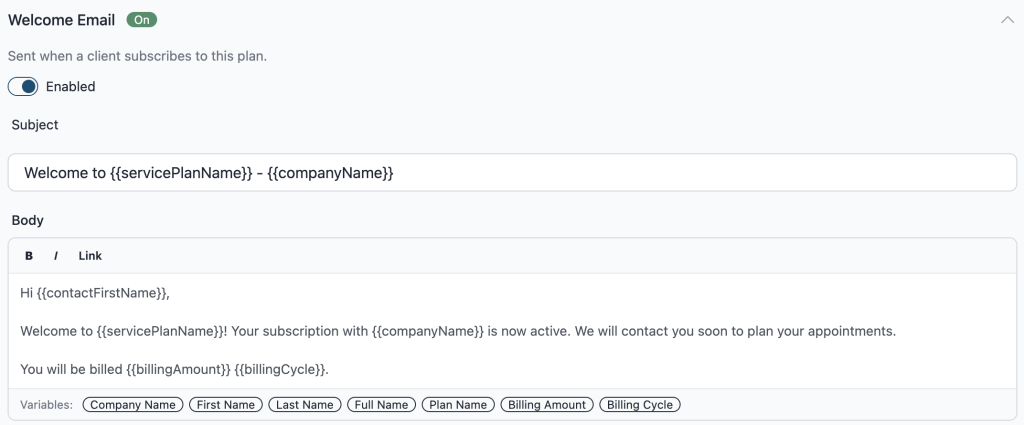
The Welcome Email is sent when a client subscribes to a service plan.
You can customize both the subject line and message body. BlueSuite also supports dynamic variables so your emails can automatically pull in subscriber and plan details.
Example variables include:
- Company Name
- First Name
- Last Name
- Full Name
- Plan Name
- Billing Amount
- Billing Cycle
An example Welcome Email subject line might look like:
Appointment Scheduled
Use this email to notify subscribers when a service appointment has been scheduled under their plan.
Appointment Reminder
Use this email to send reminders before an upcoming appointment.
Payment Receipt
Use this email to confirm that a recurring payment has been processed successfully.
How Service Plans Work
Once a customer subscribes to a plan, BlueSuite helps automate the recurring workflow by:
- Charging the customer based on the billing cycle
- Generating recurring service visits based on the visit schedule
- Sending plan-related email notifications
- Keeping subscription and payment details organized in one place
Customer Experience
Customers can subscribe to service plans through your client portal. During signup, they can review the plan, choose add-ons, enter their information, and provide payment details.
After subscribing, customers can manage their plan through the client portal.
Service Plans FAQ
What are Service Plans in BlueSuite?
Service Plans let you offer recurring memberships or maintenance plans to your customers with automated billing, recurring service visits, optional add-ons, and subscriber notifications.
How do I create a Service Plan?
Log in to BlueSuite, click Service Plans in the left-hand navigation, then click + Service Plan. Enter your plan details, billing cycle, amount per cycle, duration, visit schedule, add-ons, and email settings.
What billing cycles are available?
BlueSuite supports weekly, monthly, quarterly, semi-annual, and annual billing cycles for Service Plans.
Can customers subscribe to Service Plans online?
Yes. Customers can subscribe to your Service Plans online through the BlueSuite client portal and manage their plan after signup.
What subscriber emails can I customize?
You can customize these subscriber notification emails in BlueSuite:
- Welcome Email
- Appointment Scheduled
- Appointment Reminder
- Payment Receipt