Customer Financing Through BlueSuite: Stripe Setup Guide
Customer financing through BlueSuite lets eligible customers pay over time through Stripe. Available options may include Affirm, Klarna, and Sunbit.
Your business receives payment through Stripe, while the financing provider handles the customer’s repayment plan. Availability, financing amounts, and approval vary by provider.
Financing and Payment Schedules
A BlueSuite payment schedule lets your business split a job into a quote deposit and separate installment invoices. Customer financing is a separate arrangement in which the financing provider handles the customer’s repayments. Creating a payment schedule does not approve financing or guarantee that financing will be available for each installment.
Step 1: Set up online payments for customer financing
Connect Stripe to BlueSuite before you offer financing.
- In BlueSuite, go to Settings > Payment Processing.
- Click Begin.
- Complete Stripe’s onboarding form.
- Enter your business, tax, and bank account information.
- Return to BlueSuite after Stripe confirms your setup.
For more help, see the complete guide: Online Payment Processing in BlueSuite.
Step 2: Open your Stripe Dashboard
After Stripe confirms your account, open the dashboard from BlueSuite:
- Go to Settings > Payment Processing.
- Click Open Stripe Dashboard.
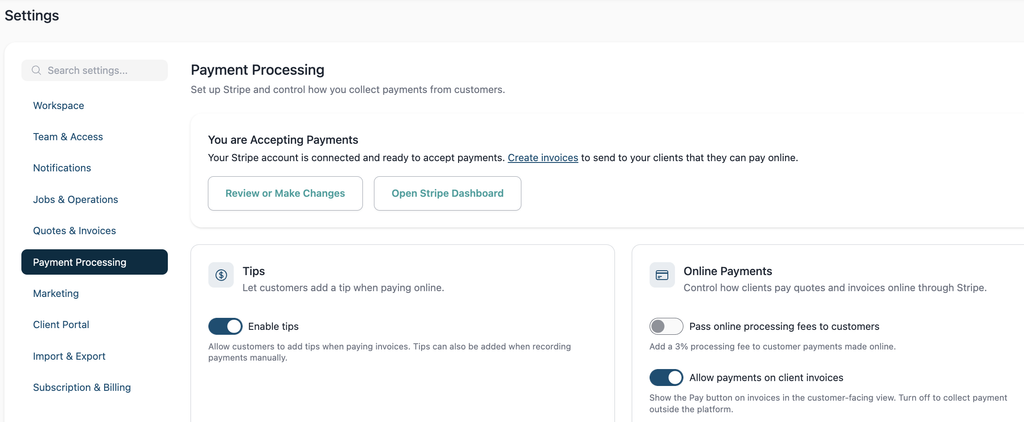
You do not need to disconnect or replace your existing Stripe account.
Step 3: Enable financing methods in Stripe
Once the dashboard opens, review your payment methods:
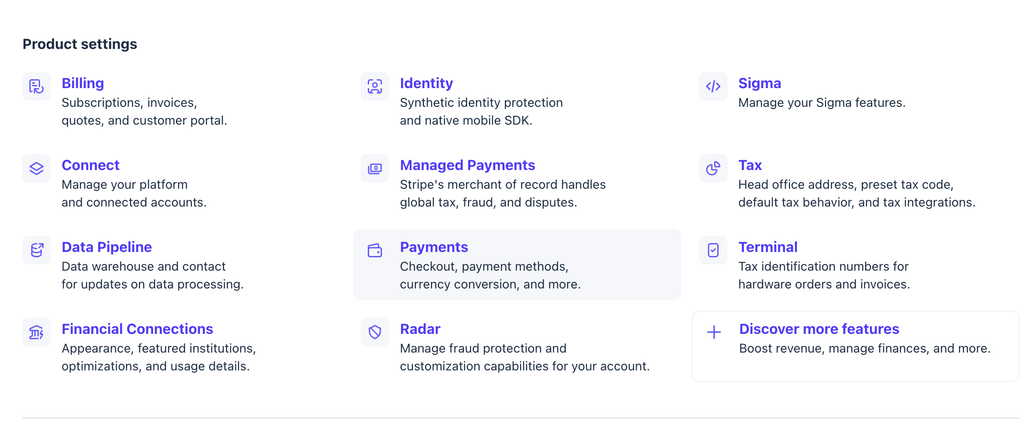
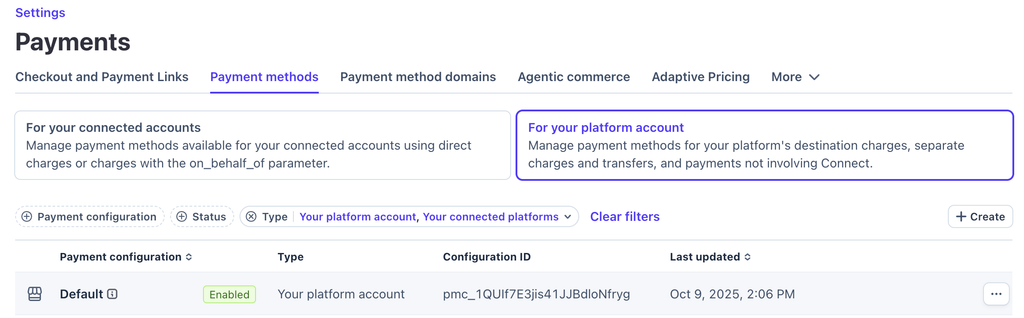
- Go to Settings > Payments > Payment Methods.
- Select the Default payment configuration.
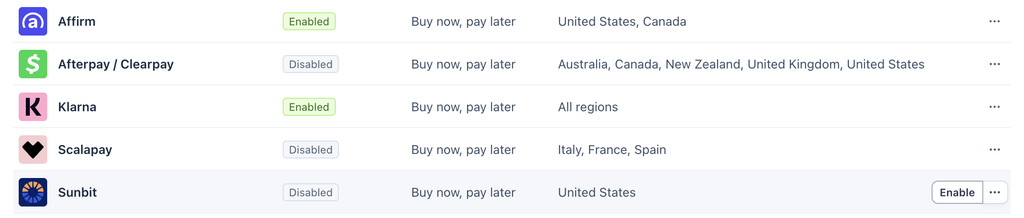
- Scroll to Buy now, pay later.
- Review Affirm, Klarna, and Sunbit.
- Click Enable next to each option you want to offer.
- Complete any additional verification requested by Stripe.
If a method is missing, read Stripe’s guide to activating a new payment method.
What customers will see
Once you enable a financing method, eligible customers may see it when paying a BlueSuite quote or invoice. The customer selects an option and completes the provider’s application. If approved, the customer sees the available repayment terms.
BlueSuite supports eligible purchases up to $20,000 through Sunbit. (Provider may approve a lower amount or different terms.)
A financing method can be enabled and still remain hidden because Stripe checks the business and customer locations, transaction amount, currency, industry, payment type, provider rules, and account verification status.
Troubleshoot customer financing
You cannot enable a financing method
If Stripe shows an error, restriction, or verification request:
- Confirm that your business information is correct.
- Check your website and industry details in Stripe.
- Take a screenshot of the payment method’s status.
- Copy the complete error or eligibility message.
- Use Stripe’s missing payment methods troubleshooting tool.
Some industries require extra review, and a provider may decline to support a specific business category. BlueSuite cannot override that decision. If Stripe does not explain the restriction, contact Stripe Support.
The method is enabled but customers cannot see it
If the method is enabled but missing at checkout, send BlueSuite Support:
- A screenshot showing the method enabled in Stripe.
- The BlueSuite quote or invoice number.
- The total payment amount.
- The financing option you expected to see.
- A screenshot of the customer’s payment options.
- Any checkout error message.
These details help us determine whether the problem is in the BlueSuite checkout or Stripe eligibility.
Your business industry or MCC is incorrect
Stripe uses a four-digit merchant category code, or MCC, to classify your business. It usually assigns the code from the industry selected during onboarding and may also review your website.
If the industry or MCC is incorrect:
- Review your business details and industry in Stripe.
- Update the industry if Stripe allows the change.
- Contact Stripe Support if you cannot make the correction.
Use the classification that accurately describes your services because Stripe may review and correct it. A different MCC does not guarantee approval for customer financing.
For more information, review Stripe’s guides to industry groups and merchant category codes.
Financing-provider requirements
Each provider sets its own supported countries, transaction limits, and business restrictions. If an option remains unavailable, review its Stripe guide:
Protect sensitive information
Finally, do not send customer banking details, full payment-card numbers, Social Security numbers, or other sensitive financial information when contacting support.
Customer financing FAQs
Do I need a separate Stripe account?
No. Use the Stripe account already connected to BlueSuite. Do not disconnect or replace it.
Which financing options can I offer?
Available options may include Affirm, Klarna, and Sunbit. However, Stripe determines which methods your business can enable.
Are customers automatically approved?
No. The financing provider reviews each customer and determines the approved amount and repayment terms.
How much can a customer finance?
BlueSuite offers financing for eligible purchases up to $20,000 via Sunbit. The provider may approve a lower amount based on its eligibility requirements.
Why does an enabled option not appear at checkout?
Stripe only displays financing methods that are eligible for that business, customer, and transaction. Location, amount, currency, industry, and payment type may affect availability.
Can BlueSuite override a Stripe restriction?
No. Stripe and each financing provider control merchant eligibility and customer approval decisions.