Optional Line Items in Quotes
BlueSuite allows you to create optional line items in quotes, giving your customers the flexibility to choose which services they want included before approving a job. Instead of sending multiple versions of the same estimate, you can present everything in one clean, professional quote.
If you are new to building estimates, review our guide on Creating and Managing Quotes to understand the full quoting workflow before adding optional services.
This feature helps you increase transparency, streamline approvals, and offer upsells without creating extra work.
What Are Optional Line Items in Quotes?
Optional line items in quotes are products or services that appear on a quote but are not automatically included in the total unless the customer selects them.
For example, you might offer:
- Deep cleaning add-ons
- Premium service upgrades
- Additional labor hours
- Equipment rentals
- Upgraded material options
Because the item is marked as optional, the customer controls whether it becomes part of the final job total.
How to Create Optional Line Items in Quotes
Optional quote items cannot be combined with a payment schedule. If you need staged payments on the quote, agree on the scope and use regular line items before adding the schedule. See Payment Schedules: Deposits and Installment Invoices for setup.
- Navigate to Quotes
- Click Create Quote
- Add your products or services
- Check the Optional box next to the line item
- Save or send the quote

If you regularly offer the same upgrades, consider building them directly into a reusable template. You can learn how in our Create a Quote Template guide. Templates help you standardize optional services across all estimates.
Once selected, the line item is clearly marked as optional when the customer views the quote.
How Optional Line Items Work for Customers
When customers open your quote, they can select or deselect optional services. As they make their selections, the total updates instantly. This allows them to approve the final version based on their choices.
As a result, the quote becomes interactive and transparent. Customers know exactly what they are paying for before they approve the job.
What Happens After Approval?
When you convert the approved quote to a job, BlueSuite carries over the selected optional items and leaves out the unselected ones. Approval and conversion are separate steps.
If the optional line item is selected:
- The pricing includes the service.
- The service appears on the job.
- The total reflects the added amount.
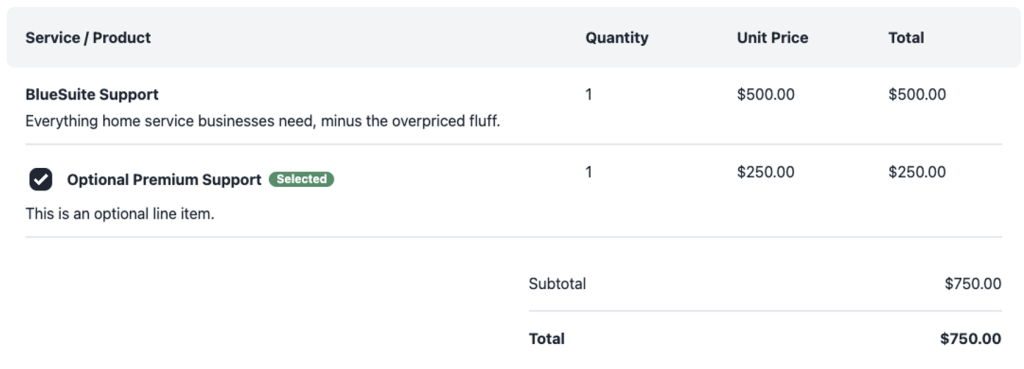
However, if the optional line item is not selected:
- The pricing excludes the service
- The line item does not carry over
- The job total remains unchanged.
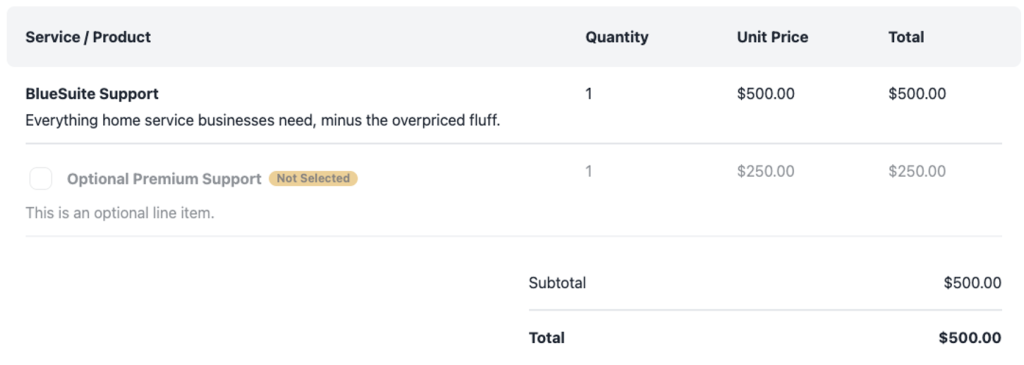
Because BlueSuite handles this automatically, you do not need to manually adjust totals.
When Should You Use Optional Line Items in Quotes?
Optional line items in quotes work best when you want to offer premium upgrades, present tiered pricing packages, provide add-on services, increase your average ticket size, or reduce back-and-forth emails.
Instead of sending multiple quotes, you can send one professional proposal and let the customer decide.
Best Practices for Optional Line Items
To get the most value from optional line items in quotes:
- Clearly describe what each optional service includes
- Avoid adding too many options at once
- Use optional lines for upgrades rather than core services
- Price add-ons strategically
When used correctly, optional line items make your quotes more flexible and more profitable.
If you need additional help managing quotes, visit our Creating and Managing Quotes guide or contact the BlueSuite Support Team for assistance.